
Blog · Guides
Check Your Digital Footprint (Presence Score)
27 August 2026 · 8 min read

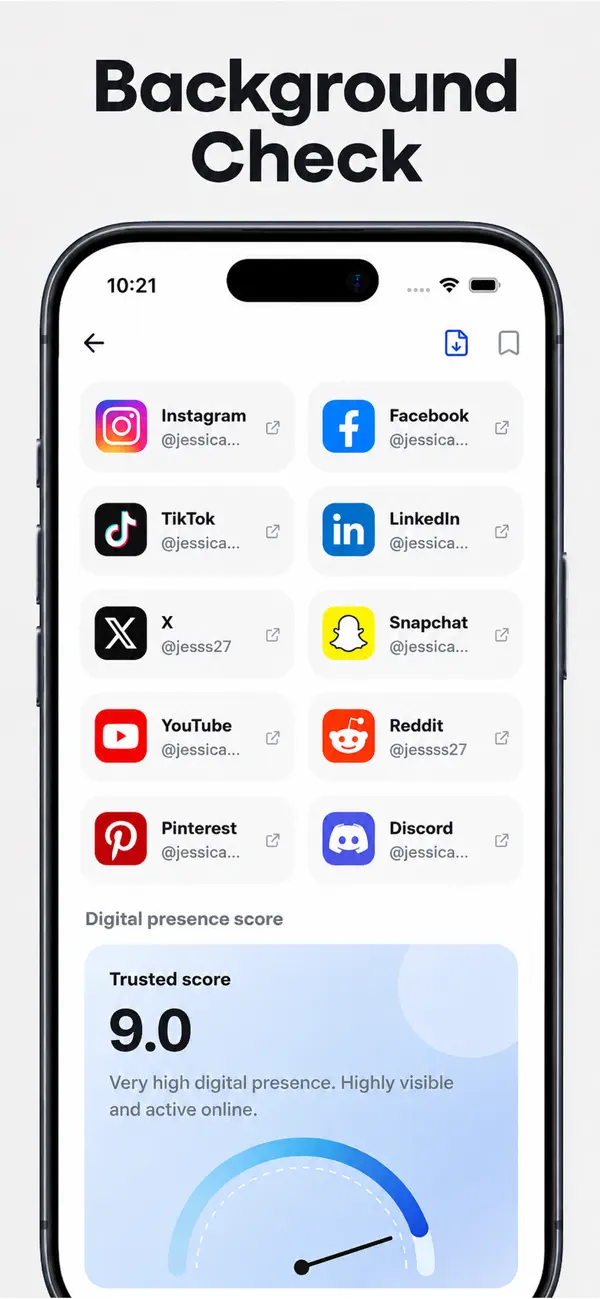
Search your own name the way a stranger would. If DeepSearch can assemble a profile, so can a recruiter, a journalist, or someone you met once. The social screen includes a digital presence score. On the sample card it reads 9.0, “Very high digital presence. Highly visible and active online.” That number is about how easy you are to find on public pages. It is not a credit score, a trustworthiness score, or a background check. It does not change your FICO file.
What a high score is saying
A 9.0 on the sample means public sources clustered: social tiles, photos, mentions. A lower score can mean you keep a small public footprint, you use a common name that did not cluster, or the public web is thin. Neither number is a moral grade. A quiet person and a careful privacy setting both look “low.”
The same screen lists public tiles for Instagram, Facebook, TikTok, LinkedIn, X, Snapchat, YouTube, Reddit, Pinterest, and Discord. Empty cells are common. Snapchat in particular often stays off the public web. See find social media accounts.
Search engines keep caches. Taking a blog down today does not erase a quoted paragraph on a news site or a PDF from a 2019 conference. The presence card will stay high until those public copies fade or get removed at the source. A locked Instagram helps the grid; it does nothing to a speaker bio that still prints your name and photo.
Presence and confidence are easy to mix up. Confidence 85% on the Ethan Walker sample is “do these sources agree this is one person?” Presence 9.0 is “how much public material is there?” You can be very visible and still be the wrong namesake, which is why you still pick the person carefully. For collisions, see common name disambiguation.
Run your own name in DeepSearch, pick yourself, and read the presence card plus every public tile. Then decide what to lock down on the original sites.


How to run the check
- Use the name you actually publish, plus city or employer if the name is common.
- Pick yourself in the list. Confirm the photo strip and identification match you.
- Read the trusted / digital presence score. The sample is 9.0, Very high digital presence.
- Open every public tile. Empty tiles can still hide private accounts.
- Change settings on the source sites. DeepSearch does not host your posts.
For data we store and how to reach us, read privacy. Search history in the app lives on device; deleting the app deletes that history. Record-broker opt-outs (Spokeo and similar) are a different industry because those companies store a file with your name on it. DeepSearch searches public pages; change the source if you want the page to disappear. See DeepSearch vs people-search sites. This is public-web research. It is not an FCRA background check. Do not use a presence score for hiring, housing, credit, or insurance.
Questions
Is the digital presence score a credit score?
No. The sample card reads 9.0, Very high digital presence. That is about how visible public pages are, not about money, character, or eligibility.
How do I remove information DeepSearch found?
DeepSearch reads public web sources. To shrink a footprint, change privacy settings on the original sites and use those sites’ removal tools. Start with our privacy page for how we handle data.
More guides